

- Posts: 34
- Thank you received: 0
TreeK 3.1.0 — Reply and edit directly in the tree
1 week 2 days ago - 1 week 2 days ago #54
by admin
TreeK 3.1.0 — Reply and edit directly in the tree was created by admin
Starting with version 3.1.0, both TreeK Free and TreeK Pro let you reply to posts and edit your own plain-text posts directly in the discussion tree.
1.Reply with ✚. Click ✚ in the post’s row to open the compact reply form for plain-text replies. If you want to add formatting, a link, or an attachment, click F (Open in forum) to continue writing in the full forum editor. Use the bell 🔔 to choose whether to receive notifications about new replies to the topic.
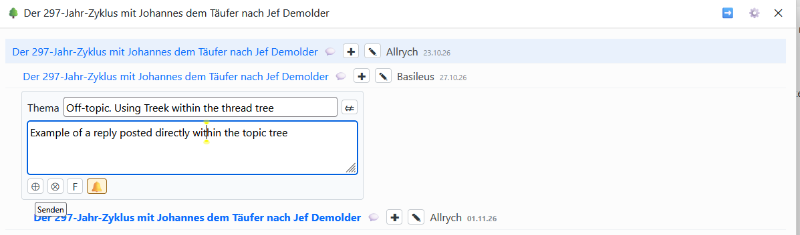
2. Edit with ✎. Click ✎ in the post’s row. If the post contains only plain text, the compact edit form opens directly in the tree. If the post contains formatting, a link, or an attachment, the full forum editor opens. Editing in the tree preserves your current topic subscription.
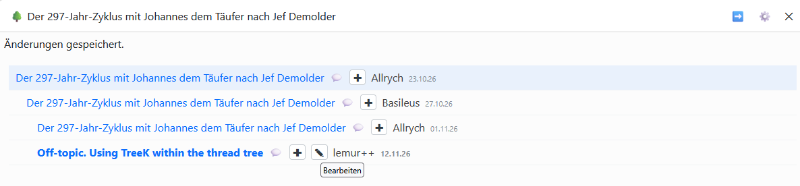
3. Reply titles in Free and Pro. In TreeK Free, a reply posted in the tree copies the title of the post it replies to (as Kunena currently does). To change the title, use Edit in the Kunena forum view with the TreeK template. In TreeK Pro, the compact form includes a Subject field. Depending on your title settings, it can start blank, inherit the parent post’s title, or use the configured suffix.
4. Settings close automatically. By default, the settings window closes after 15 seconds of inactivity. Reopen it with ⚙ (Settings). The site administrator can change the timeout or disable automatic closing.
5. Permissions and tooltips. Kunena permissions determine which actions are available for each user and post. The buttons in the compact form have tooltips.
Compatibility and installation
TreeK Free and Pro 3.1.0 support Kunena 7.0.11, 7.1.0, and 7.1.1 on Joomla 5.4, 6.0, 6.1, and 6.2. On the Joomla 5.4 branch, TreeK requires Joomla 5.4.7 or later with Kunena 7.0.11, and Joomla 5.4.10 or later with Kunena 7.1.0 or 7.1.1.
An internet connection is required during installation.
Upload the ZIP through the Joomla extension installer. If TreeK is already installed, upload the ZIP as an update.
Privacy and Pro licensing
TreeK does not use analytics or send forum posts, user accounts, or browsing activity to TreeK’s servers. TreeK contacts treek.support to download template files and check version compatibility.
TreeK Pro buyers provide the URLs of the sites they want to license. When Joomla downloads a Pro update, it sends the site’s URL and download key to treek.support to verify access to the package.
1.Reply with ✚. Click ✚ in the post’s row to open the compact reply form for plain-text replies. If you want to add formatting, a link, or an attachment, click F (Open in forum) to continue writing in the full forum editor. Use the bell 🔔 to choose whether to receive notifications about new replies to the topic.
2. Edit with ✎. Click ✎ in the post’s row. If the post contains only plain text, the compact edit form opens directly in the tree. If the post contains formatting, a link, or an attachment, the full forum editor opens. Editing in the tree preserves your current topic subscription.
3. Reply titles in Free and Pro. In TreeK Free, a reply posted in the tree copies the title of the post it replies to (as Kunena currently does). To change the title, use Edit in the Kunena forum view with the TreeK template. In TreeK Pro, the compact form includes a Subject field. Depending on your title settings, it can start blank, inherit the parent post’s title, or use the configured suffix.
4. Settings close automatically. By default, the settings window closes after 15 seconds of inactivity. Reopen it with ⚙ (Settings). The site administrator can change the timeout or disable automatic closing.
5. Permissions and tooltips. Kunena permissions determine which actions are available for each user and post. The buttons in the compact form have tooltips.
Compatibility and installation
TreeK Free and Pro 3.1.0 support Kunena 7.0.11, 7.1.0, and 7.1.1 on Joomla 5.4, 6.0, 6.1, and 6.2. On the Joomla 5.4 branch, TreeK requires Joomla 5.4.7 or later with Kunena 7.0.11, and Joomla 5.4.10 or later with Kunena 7.1.0 or 7.1.1.
An internet connection is required during installation.
Upload the ZIP through the Joomla extension installer. If TreeK is already installed, upload the ZIP as an update.
Privacy and Pro licensing
TreeK does not use analytics or send forum posts, user accounts, or browsing activity to TreeK’s servers. TreeK contacts treek.support to download template files and check version compatibility.
TreeK Pro buyers provide the URLs of the sites they want to license. When Joomla downloads a Pro update, it sends the site’s URL and download key to treek.support to verify access to the package.
Last edit: 1 week 2 days ago by admin.
Please Log in or Create an account to join the conversation.
Time to create page: 0.375 seconds